

Virtual Home Staging: Fast, Affordable, MLS-Ready

Virtual Home Staging: Fast, Affordable, And MLS-Ready Results
Introduction
An empty listing photo feels a bit like a blueprint without furniture. The bones are there, but it is hard to picture real life in the space. Compare that to a listing where every room looks bright, furnished, and move‑in ready through virtual home staging. One gets scrolled past; the other gets saved, shared, and booked for showings.
NAR research shows that more than eight out of ten buyers say staging helps them picture a house as their future home. That matters when nearly every buyer starts their search online. If the photos do not spark an emotional “I can live there” reaction, the listing loses attention in seconds.
Physical staging can help, but it is expensive, slow, and difficult to repeat at scale. Virtual staging with AI changes that math. With a platform like VizCloud, agents, designers, and architects can go from plain photos to photorealistic, MLS‑ready images in minutes, without touching design software or renting a single chair.
The National Association of Realtors reports that staging makes it easier for buyers to visualize the property as their future home—and virtual staging taps directly into that insight.
In this guide, you will see what virtual home staging is, how it compares to physical staging, why it boosts sales and prices, how AI tools work, and how to choose the right platform. You will also see how VizCloud gives real estate and design professionals fast, affordable results they can use on every listing.
Key Takeaways
-
Virtual home staging turns empty or dated rooms into attractive images that help buyers picture real life in the home.
-
Compared to physical staging, it is faster, cheaper, and much easier to apply across every listing.
-
VizCloud brings virtual staging AI into everyday real estate work—no design background or 3D skills needed.
-
Modern tools add furniture removal, multiple styles, 360 imagery, and virtual renovation, not just basic staging.
-
Strong results depend on more than software: good photos, smart style choices, and clear MLS disclosure all matter.
What Is Virtual Home Staging?
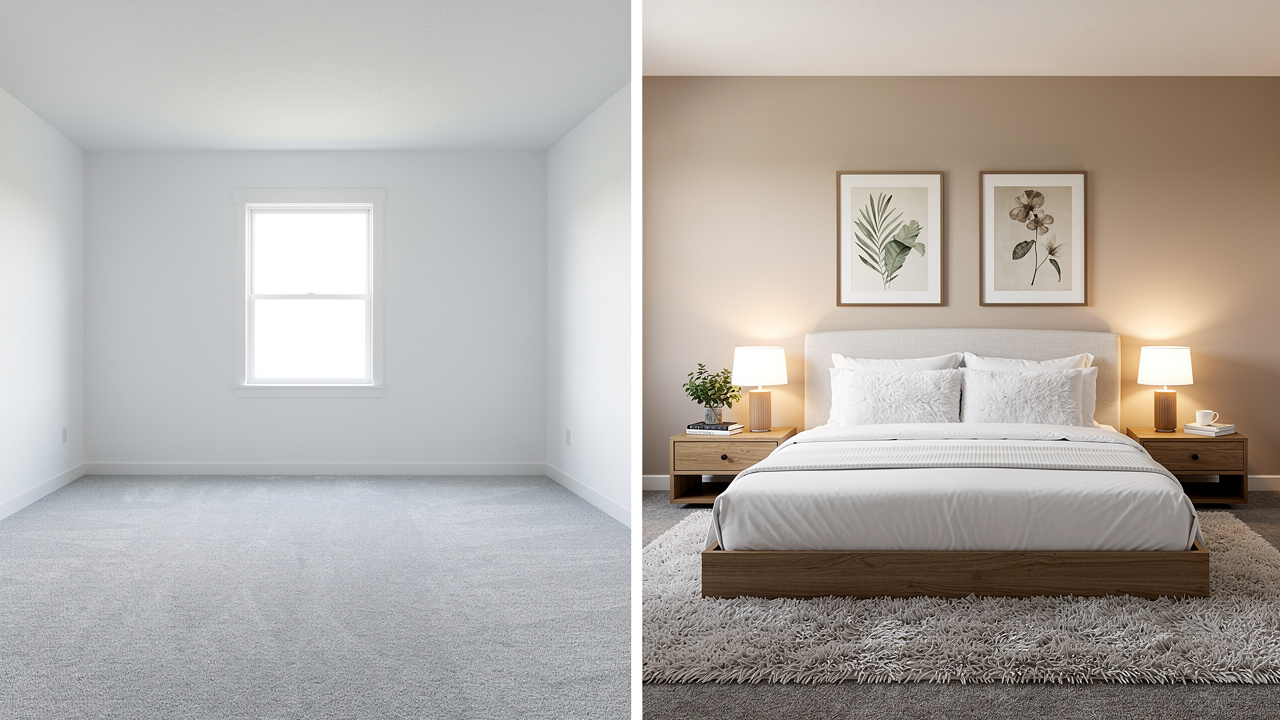
Virtual home staging is a digital method of showing a property at its best by adding furniture, decor, and finishes directly into photos. Instead of hauling in sofas and artwork, you start with images of an empty or outdated room and use software to fill the space. The final photo looks like a professionally staged home, but nothing has been moved on site.
Behind the scenes, staging tools combine photo analysis, 3D models, and AI. The software reads the room layout, walls, windows, and light sources, then places digital furniture so that scale, perspective, shadows, and reflections look convincingly real. With newer virtual staging AI, this can happen with a single click.
The goal is simple: help buyers understand how a room works for daily life. Empty rooms feel cold and often look smaller than they are; staged photos show where a sofa, dining table, or bed actually fits. That added context lines up with NAR findings that most buyers say staging helps them picture living in a home.
AI has also changed who can use virtual staging. Platforms like VizCloud produce photorealistic results in minutes and hide complex tools behind a simple interface. For agents and design professionals, that turns virtual staging from a rare, special project into an everyday marketing habit.
Virtual Staging Vs Physical Staging: A Side-By-Side Comparison
Physical and virtual staging share the same goal, but they reach it differently. Physical staging uses real furniture and on‑site work. Virtual staging works from photos and software alone, which shows up clearly in cost, speed, and flexibility.
|
Factor |
Physical Staging |
Virtual Home Staging |
AI Virtual Home Staging |
|---|---|---|---|
|
Typical Cost |
About 2,000–5,000 dollars per property |
About 5–100 dollars per image |
About $0.10 per image |
|
Time Needed |
Several days to weeks to plan and install |
1-2 days |
Seconds |
|
Flexibility |
One look per room, hard to change |
Many styles and layouts from the same photo |
Many styles and layouts from the same photo |
|
Logistics |
Furniture rental, movers, storage, insurance |
Photo upload only, no on‑site work |
Photo upload only, no on‑site work |
|
Location |
Limited by local stagers and inventory |
Any property, as long as you have clear photographs |
Any property, as long as you have clear photographs |
Because virtual staging is digital, the same room can appear as a nursery, home office, or gym in separate photos. That kind of variation is nearly impossible with physical furniture yet simple and cost‑effective with tools like VizCloud.
Why Virtual Staging Is Essential For Real Estate Success

For agents, architects, and designers, virtual home staging is not just a visual trick. It directly affects how fast a listing moves and what it sells for. When almost every buyer starts online, photos become the first showing. If those photos fall flat, the rest of the marketing pipeline never gets a chance.
Studies from NAR and staging associations point in the same direction: staged homes—physical or virtual—tend to sell faster and for more money than comparable non‑staged properties. Buyers see staged homes as better maintained and closer to move‑in ready. That sense of “less work for me” carries real dollar value.
As many agents like to say, “We sell the feeling, not just the floor plan.” Virtual staging helps create that feeling at scale.
From a business point of view, virtual staging works as a high‑ROI marketing spend. A few hundred dollars spread across key photos can help secure thousands of dollars in extra sale price or trim weeks off time on market. With fast AI platforms such as VizCloud, it becomes practical to stage almost every listing, not just premium ones.
Faster Sales And Reduced Time On Market
Staged listings usually move faster than their non‑staged competition. Well‑presented homes get more clicks, saves, and showing requests, which often leads to offers in days rather than weeks.
With virtual home staging, you can:
-
Stage all key rooms the same day you receive photos.
-
Launch listings sooner, without waiting for furniture deliveries.
-
Cut vacancy periods and extra carrying costs for sellers.
Higher Offers And Perceived Value
Buyers do not make offers based only on square footage. They react to how a home feels. Staged photos signal that a property is appealing and well cared for, and they help buyers imagine daily routines in the space.
That emotional pull can:
-
Attract more buyers per listing.
-
Encourage stronger first offers.
-
Support higher sale prices compared with non‑staged comps.
Exceptional Cost Efficiency
Physical staging often costs two to five thousand dollars per property, which prices many owners out. Virtual staging flips that calculation.
With virtual staging real estate projects you can:
-
Stage a full set of photos for one to a few hundred dollars.
-
Use subscription models to bring per‑image cost even lower on platforms like VizCloud.
-
Recover the spend with a small bump in sale price or a shorter time on market.
How AI-Powered Virtual Staging Works: The VizCloud Advantage
For many professionals, AI‑driven visuals sound technical at first. In practice, modern virtual staging AI platforms are built to feel simple. The heavy lifting happens behind the scenes while you follow a short, repeatable process.
At a high level, AI models:
-
Analyze a photo to understand walls, floors, windows, and light.
-
Position 3D furniture and decor that matches the room’s perspective.
-
Add shadows, reflections, and materials that blend with the original scene.
VizCloud is designed around this idea of simplicity. You upload property photos, pick a room type and style, and let the AI build a layout. Because the platform focuses on real estate, its catalog and styles are tuned to what buyers expect in listing photos, not just what looks good in a design magazine.
You do not need design software skills. VizCloud runs in the browser, accepts common photo files, and guides you from upload to finished, MLS‑ready images in a few minutes per room.
The 6-Step Virtual Staging Process
Once you have done it a few times, virtual home staging follows a fast routine:
-
Image Upload
Start with clean, high‑resolution photos (camera or modern smartphone). Upload to VizCloud, label by room, and create a project. -
Furniture Removal And Decluttering
Use AI removal to clear outdated or bulky items. A selective eraser lets you remove only problem pieces—boxes, toys, personal photos, etc. -
Style Selection
Choose the room type (living room, bedroom, office) and pick a style such as modern, Scandinavian, farmhouse, coastal, or industrial. Optionally, nudge color direction to match existing finishes. -
AI Generation
The AI studies layout, ceiling height, and light sources, then places sofas, beds, tables, rugs, and decor. On VizCloud, this render step often finishes in 10 seconds to two minutes. -
Review And Refinement
Check the staged image. If it is not quite right, regenerate or use a drag‑and‑drop editor to move, resize, or swap furniture from the catalog. -
Download And Deploy
Export high‑resolution, MLS‑ready files and publish them across MLS, portals, your website, social media, flyers, and presentations.
VizCloud Instant Rendering Technology
VizCloud’s strength is speed without giving up quality. Its AI is tuned for real estate visuals, so results look natural in listing feeds and print marketing. Most rooms go from upload to finished staging in just a few minutes.
Because staging, virtual renovation, and image polishing all live inside one web interface, you stay in control of your marketing calendar instead of waiting days for outside vendors.
AI-Powered Vs Human-Designed Virtual Staging: Choosing The Right Approach
There are two main ways to get virtually staged images:
-
AI‑based platforms such as VizCloud.
-
Studios with human designers who place 3D furniture by hand.
Both can deliver strong results, but they fit different budgets, timelines, and property types.
AI staging shines for day‑to‑day work. It is fast, affordable, and easy to scale across every listing. Quality has reached a level that works well for most residential marketing.
Human‑designed virtual staging still has a place at the top of the market, where luxury developers or architects may want custom furniture models and deep creative control. That level of service raises price and turnaround time.
AI-Powered Virtual Staging: The VizCloud Model
AI‑based virtual house staging focuses on speed and repeatability:
-
Staging a single image usually takes seconds to a couple of minutes.
-
Subscription or credit models keep per‑image prices low.
-
Unlimited variations let you test several looks without extra fees.
VizCloud combines near‑instant rendering with a style library and feature set that match most real‑world needs—ideal for residential properties, small multifamily buildings, and design presentations.
Human-Designed Virtual Staging
Human‑designed virtual staging uses 3D artists and interior designers who work through each image by hand. This method:
-
Delivers outstanding results for luxury listings and flagship projects.
-
Often costs 50–150 dollars per image.
-
Takes 1–3 days or more, especially when revisions are involved.
It is best reserved for projects where marketing budgets and branding goals justify the extra time and expense.
Making The Right Choice For Your Listings
When deciding between AI and human‑designed staging, weigh:
-
Property type and price point
-
Volume of listings
-
Timeline
-
Budget
Most residential listings benefit more from fast, affordable AI staging applied to every room. Human designers can stay in the toolkit for a handful of special, high‑profile properties each year.
Essential Features Of Modern Virtual Staging Platforms

Not all virtual staging platforms are created equal. Some only drop in furniture; others support decluttering, 360 tours, exterior scenes, and virtual renovation. For architects, designers, and agents, that broader toolset can make daily work much easier.
A modern platform should:
-
Accept many inputs (simple photos, 360 images, 3D exports).
-
Keep furniture catalogs current and realistic.
-
Produce images that hold up under close inspection.
VizCloud was built with these needs in mind. It combines AI furniture addition, precise furniture removal, multiple styles, 360 and Matterport support, and strong virtual renovation tools inside one interface.
AI-Powered Furniture Addition And Extensive Style Libraries
The core of any staging platform is convincing furniture and decor. That means:
-
Correct scale and perspective.
-
Lighting and shadows that match the original photo.
-
Materials and fabrics that look natural.
Leading tools pull from large catalogs covering modern, Scandinavian, farmhouse, coastal, industrial, and more. VizCloud uses curated sets tuned for listing photos, so designs feel current and broadly appealing.
Advanced Furniture Removal And Decluttering
Occupied homes often contain heavy or very personal furniture that works poorly in marketing photos. Modern AI tools can:
-
Strip out all furniture with one click.
-
Or remove specific items—recliners, toys, pet beds, clutter—while preserving the room.
VizCloud focuses on keeping the underlying photo intact, so windows, flooring, and fireplaces stay accurate for MLS rules.
Customization And Unlimited Revisions
Professionals often want more control than a single AI pass. A good platform offers:
-
Unlimited regenerations without extra fees.
-
A drag‑and‑drop editor for moving, resizing, or swapping pieces.
-
The option to build layouts piece by piece when needed.
VizCloud uses AI suggestions as a starting point, then lets you refine scenes quickly.
360 Degree And Matterport 3D Tour Staging
As buyers grow more comfortable with remote viewings, 360 tours and Matterport models matter more. Staging these views:
-
Makes empty tours feel warm and usable.
-
Helps buyers understand room scale while “walking” the property.
VizCloud supports 360 images and tour‑friendly outputs, keeping style consistent between still photos and immersive content.
Virtual Renovation And Enhancement Tools
Staging alone cannot fix dated finishes. Virtual renovation tools help by:
-
Swapping carpet for hardwood.
-
Repainting walls.
-
Refreshing cabinets and tile.
-
Creating day‑to‑dusk exterior shots.
In VizCloud, renovation and image polishing sit alongside staging tools, so you can show both “as‑is” and “after” views in one workflow.
10 Powerful Virtual Staging Tools For Real Estate Professionals In 2025
The market for virtual staging real estate tools now ranges from lightweight AI services to full concierge agencies. Below are ten well‑known options and where they fit. VizCloud comes first because it offers a strong all‑around mix of speed, quality, and features in a single platform, without turning your listing into a sales pitch.
1 VizCloud – Best All-In-One AI Virtual Staging For Speed And Quality
VizCloud is an AI‑powered platform built specifically for virtual home staging. It accepts plain photos or 3D outputs and turns them into photorealistic interiors ready for MLS and client presentations.
Highlights:
-
Web‑based interface, no design software required.
-
Instant AI rendering, broad style library, smart furniture removal.
-
360 support, virtual renovation, and image polishing in one place.
-
Transparent subscription and credit options that scale from solo agents to teams.
For most everyday staging tasks, VizCloud balances cost, speed, and visual quality very well.
2 Apply Design – Best For DIY Customization And Manual Control
Apply Design mixes AI with a detailed manual editor. The software suggests layouts, then lets users move, rotate, and replace each item. It:
-
Appeals to people who enjoy hands‑on design work.
-
Delivers strong control over each scene.
-
Comes with a steeper learning curve and more time per image than one‑click tools.
3 Virtual Staging AI – Best For Ultra-Fast, Budget-Friendly Volume
Virtual Staging AI focuses on speed and low cost:
-
Stages images in around 10–15 seconds.
-
Uses subscription plans to keep per‑image pricing very low.
-
Offers a narrower style range and fewer advanced features than richer platforms like VizCloud.
It suits simple, high‑volume jobs where cost is the main concern.
4 BoxBrownie – Best For Human-Designed Luxury Staging
BoxBrownie is known for human‑led virtual staging and photo editing. A design team:
-
Handles each file manually.
-
Produces polished scenes suited to high‑end listings.
-
Charges higher per‑image prices and requires 24–48 hours or more for delivery.
Ideal for luxury properties and developments that justify premium service.
5 Styldod – Best For Matterport 3D Tour Specialists
Styldod offers a mix of services, with a strong emphasis on Matterport tour staging:
-
Furnishes individual hotspots inside 3D tours.
-
Supports immersive, remote‑buyer experiences.
-
Prices work per hotspot or per tour, with longer timelines than instant AI tools.
Useful when Matterport sits at the center of your marketing strategy.
6 Rooomy – Best For Enterprise-Level Furniture Catalog Integration
Rooomy connects real estate visuals with large retail furniture catalogs:
-
Often works with national brokerages and big retailers.
-
Lets users stage rooms with items tied to real‑world products.
-
Is more complex and enterprise‑oriented than many small teams need.
Boutique firms and solo agents often prefer lighter options such as VizCloud for day‑to‑day use.
7 Peddle – Best For Integrated Real Estate Marketing Suites
Peddle includes virtual staging as part of a broader marketing platform:
-
Offers tools for property sites, social scheduling, and more.
-
Appeals to agents who want a single vendor for most marketing tasks.
-
Provides staging features that are solid but not as deep as dedicated platforms.
It suits users who value an all‑in‑one marketing hub over specialized staging controls.
8 VisualStager – Best For Desktop Software Preference
VisualStager is a traditional desktop application:
-
Runs locally, which appeals to users who prefer offline tools.
-
Provides drag‑and‑drop furniture placement inside room photos.
-
Requires software installation, updates, and more manual effort than cloud platforms.
Teams that work across devices or locations may find web tools like VizCloud more convenient.
9 Spotless Agency – Best For White-Glove Concierge Service
Spotless Agency operates as a full‑service visualization studio:
-
Manages staging, advanced retouching, and 3D renders for luxury projects.
-
Assigns account managers and delivers highly customized work.
-
Costs more and takes longer than AI tools, but offers a very hands‑off experience for busy agents.
Best for top‑tier listings and developments where presentation budgets are larger.
10 PhotoUp – Best For Photo Editing Bundle Packages
PhotoUp combines virtual staging with many other editing services:
-
Exposure correction, sky replacement, floor plan redraws, and more.
-
Lets agents send full photo sets to a single vendor.
-
Uses per‑task pricing and human editors, so costs and turnaround times are higher than instant AI.
Teams already using PhotoUp may add staging easily; others may prefer VizCloud’s integrated AI staging and renovation.
Strategic Applications Beyond Basic Listing Photos
Virtual home staging does more than make empty rooms look furnished. Once you have a fast, flexible tool, new uses emerge across sales, design, and client communication.
You can:
-
Show multiple uses for the same room.
-
Help buyers look past dated finishes.
-
Market properties long before construction finishes.
-
Create personalized visuals for specific clients.
VizCloud supports these cases with both simple photo inputs and more advanced 3D‑based workflows.
Marketing Multi-Functional Spaces To Different Buyers
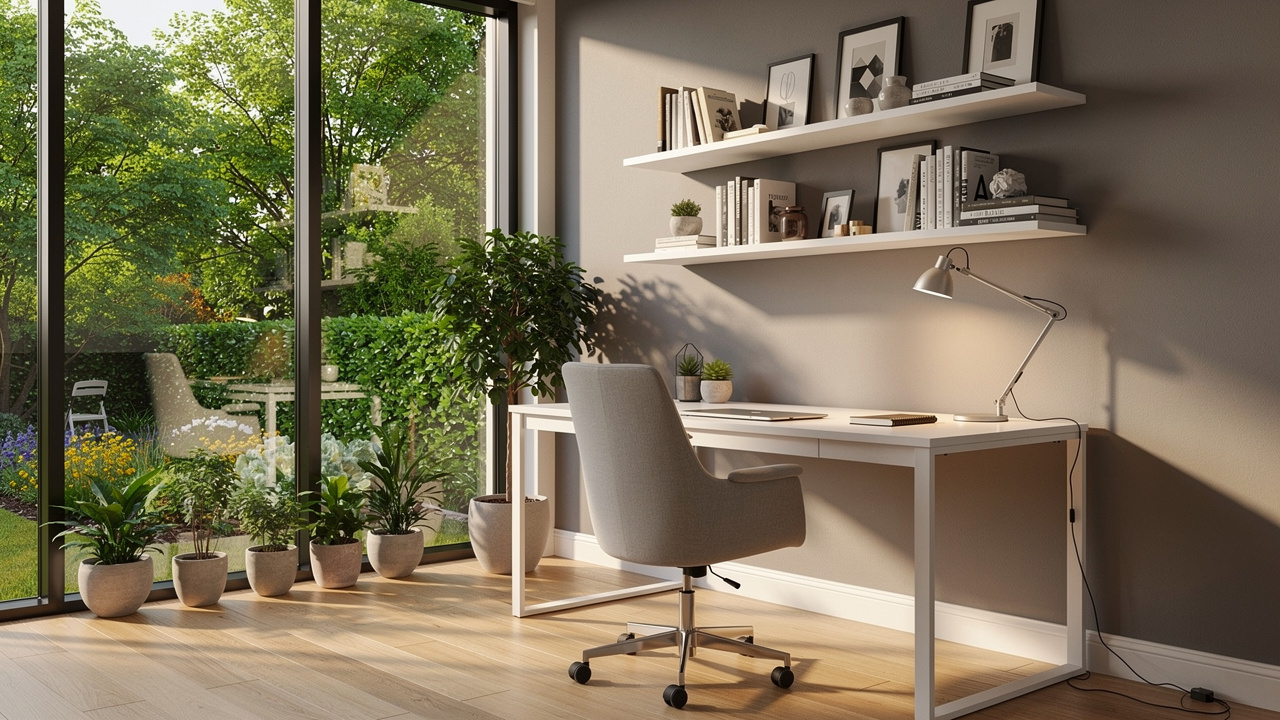
Bonus rooms—lofts, dens, finished basements—can tip buyer decisions, but empty they often read as “extra space.” With virtual staging, you can:
-
Show one version as a home office.
-
Show another as a nursery or playroom.
-
Show a third as a gym or guest suite.
Each image speaks to a different buyer type using the same underlying room, and VizCloud’s unlimited variations keep costs low.
Overcoming Buyer Objections With Virtual Renovations
Older properties bring common objections about flooring, paint, or kitchens. Virtual renovation helps buyers see what is possible by:
-
Updating finishes in staged images.
-
Presenting “before and after” comparisons.
-
Highlighting that many changes are cosmetic, not structural.
With VizCloud, renovation visuals live in the same workflow as staging, so you can respond to concerns early.
Pre-Construction And Development Marketing
Developers and architects often need strong visuals before units are finished. By combining 3D models or early photos with virtual staging, you can:
-
Pre‑sell units or leases.
-
Support planning meetings and approvals.
-
Show realistic, furnished interiors instead of just drawings.
VizCloud can stage images based on 3D inputs to create marketing materials months ahead of completion.
Buyer’s Agent Tool For Personalized Presentation
Virtual staging also helps buyers. A buyer’s agent can:
-
Stage a home with furniture similar to the client’s pieces.
-
Test different layouts for tricky rooms.
-
Adjust styles to match a client’s taste.
This kind of personalized visual can rescue a property that a client might otherwise dismiss.
Selecting The Right Virtual Staging Service: Key Evaluation Criteria
Choosing a virtual staging provider is about more than chasing the lowest price. Image quality, speed, features, and ease of use all shape how helpful the tool will be.
Start by asking:
-
How many listings or projects do you handle each month?
-
Do you need 360 tours or just still photos?
-
Will virtual renovation matter to you?
-
Who on your team will use the tool?
Across these questions, VizCloud scores well because it is aimed squarely at real estate and design professionals who want strong visuals without technical friction.
Image Quality And Photorealism
Staging helps only when images look believable. When you review sample galleries, look for:
-
Accurate light and shadows.
-
Correct proportions.
-
Natural fabrics and materials.
VizCloud focuses on photorealistic output suitable for professional marketing, so staged furniture blends smoothly with real photography.
Turnaround Time And Workflow Efficiency
Real estate moves fast. AI tools that deliver results in minutes give you more control than human services that take days.
Consider:
-
How quickly you can go from upload to download.
-
Whether the tool fits into your current process.
-
If you can stage, revise, and publish in the same afternoon.
VizCloud is built for short cycles and high listing tempo.
Pricing Structure And Total Cost Of Ownership
Look past headline image prices and consider:
-
How many images you stage per listing.
-
How often you need revisions.
-
Whether features like decluttering or 360 support cost extra.
VizCloud keeps pricing transparent and includes regenerations and standard styles without hidden add‑ons.
Feature Set And Platform Capabilities
Decide which features you actually need:
-
Furniture addition and removal
-
Style variety
-
360 and tour support
-
Virtual renovation
-
Exterior scenes
VizCloud brings these into one platform, which reduces the need for multiple tools and extra training.
Ease Of Use And Learning Curve
If only one person on the team can run the software, you create a bottleneck. Look for:
-
Clear steps from upload to export.
-
Minimal jargon.
-
Helpful defaults for non‑designers.
VizCloud is designed so new users can produce strong results after a short trial.
Best Practices For Maximum Virtual Staging Impact
Even the best platform cannot fix weak inputs or confusing design choices. To get the most from virtual home staging, follow a few practical habits.
“You never get a second chance to make a first impression” is a cliché for a reason—especially for listing photos.
Start With High-Quality Photography

Staging quality is limited by the original photo. Whenever possible:
-
Use a professional photographer or a recent smartphone.
-
Shoot well‑lit rooms with curtains open and lights on if needed.
-
Avoid extreme wide angles that distort walls.
-
Clear obvious clutter before shooting.
Clean photos give AI models more to work with and reduce editing artifacts.
Choose Appropriate Design Styles For Target Market
Match style to property and buyer profile:
-
Urban condos: modern, contemporary, or industrial.
-
Suburban homes: transitional, farmhouse, or traditional.
-
Vacation or coastal: lighter palettes and relaxed furniture.
Also consider architecture and existing finishes so staging and structure feel aligned. VizCloud’s style library makes it easy to stay on theme.
Maintain Consistency Across Listing Photos
Buyers scan photos quickly, forming an impression in seconds. To avoid confusion:
-
Use a consistent style and color palette across rooms.
-
Keep layouts consistent across multiple angles of the same room.
-
Avoid mixing extremes (e.g., ultra‑minimal in one room, heavy traditional in another).
Multi‑view staging tools in VizCloud help keep furniture placement steady from shot to shot.
Ensure MLS Compliance And Ethical Disclosure
Most MLS systems allow virtual staging but expect clear disclosure. Best practices include:
-
Marking photos as “Virtually Staged” in captions or with a small watermark.
-
Avoiding changes to permanent features that misrepresent size, layout, or condition.
-
Using virtual renovation images as supplements, not replacements, for “as‑is” photos.
Honest disclosure builds trust and avoids issues later in the transaction.
The Future Of Virtual Staging AI: Innovation And Market Trends
Virtual home staging is already standard for many professionals, and AI advances will deepen that role. Models are getting better at understanding geometry, lighting, and style context, bringing visuals even closer to site photography.
At the same time, more agents, designers, and developers treat virtual staging as a normal line item rather than an add‑on. As costs drop and tools get easier to use, even small offices can apply it across every listing.
Increasing AI Sophistication And Realism
New AI models are improving:
-
How they handle unusual room shapes.
-
How they treat reflective surfaces and mixed lighting.
-
How well they match existing finishes and textures.
VizCloud invests in these upgrades so users can rely on images that meet rising expectations and closer buyer scrutiny.
Expanded Immersive And Video Capabilities
Static images will remain essential, but buyers are paying more attention to motion and interactivity. AI is starting to:
-
Build smooth walkthrough videos from sets of photos.
-
Create staged 360 tours and VR‑style experiences.
VizCloud is developing features in this area so users can turn staged scenes into richer content with minimal extra work.
Broader Industry Adoption And Standardization
Virtual staging is moving from “nice extra” to “expected” in many markets. Trends include:
-
Clearer MLS rules about what is allowed.
-
Brokerages including staging in standard marketing packages.
-
Buyers assuming they will see both empty and staged views.
Lower costs and easier tools widen adoption beyond large offices to independent agents and small studios.
Integration With Broader PropTech Ecosystem
Real estate teams now rely on CRMs, listing portals, and marketing automation. The most helpful visual tools will:
-
Integrate with existing systems.
-
Share data smoothly across platforms.
-
Support APIs for custom workflows.
VizCloud is built with integration in mind so its rendering tools can connect into modern proptech stacks.
Key Takeaways
-
Virtual home staging gives listings emotional appeal at a fraction of the cost and time of physical staging.
-
AI platforms like VizCloud make staging practical for almost every agent, architect, and designer—no advanced software skills needed.
-
Strategic use goes beyond empty rooms: multi‑functional spaces, pre‑construction marketing, and virtual renovation all benefit.
-
Pair strong photography, thoughtful design choices, and honest MLS disclosure with the right platform to get the best results.
Conclusion
Virtual home staging has shifted from a niche service to a core part of modern real estate marketing. By turning plain or outdated photos into warm, furnished scenes, it helps buyers picture daily life in a property and gives listings a real edge online.
AI‑based tools now put this capability within reach for almost every professional. Instead of booking movers and renting furniture, you upload photos, choose a style, and receive polished images ready for MLS and social media.
VizCloud stands out by combining instant AI rendering, rich style options, decluttering, and virtual renovation in a single web platform. It gives real estate agents, architects, interior designers, and BCIN designers a practical way to produce photorealistic, client‑ready visuals in minutes, with clear pricing and an intuitive interface.
As the market grows more visual and buyers expect strong imagery from the start, the case for virtual home staging only grows stronger. Load your next set of listing photos into VizCloud and see how quickly an empty space becomes a compelling, MLS‑ready listing.
FAQs
How Much Does Virtual Staging Typically Cost?
Costs vary by provider and method. AI‑based platforms such as VizCloud often land around 5–25 dollars per image, with subscriptions bringing the effective price even lower for frequent users. Human‑designed services commonly start near 49 dollars per image and can reach 150 dollars or more for complex scenes. Even at the higher end, one stronger offer or a shorter time on market can more than cover the spend.
Is Virtual Staging Allowed On MLS Listings?
Most MLS systems allow virtual staging as long as it is disclosed clearly. Common approaches include adding a “Virtually Staged” note in each relevant photo caption or including a short remark in the listing description. The key is not to alter permanent features in a way that misleads buyers about size, layout, or condition. VizCloud outputs MLS‑friendly images; you simply add the correct captions or labels before publishing.
How Realistic Does AI Virtual Staging Look?
Modern virtual staging AI can produce images that look very close to real, physically staged photos at normal viewing sizes. Advanced models handle lighting, shadows, reflections, and materials with high accuracy. Realism still depends on the starting photo and platform used, but VizCloud focuses on photorealistic output suitable for professional marketing, with furniture proportions and perspective aligned to the actual room.
Can I Stage Occupied Homes Or Just Empty Ones?
You can stage both. For occupied homes, AI‑driven furniture removal tools can:
-
Clear an entire room digitally.
-
Or remove only specific problem items.
After that, you stage the cleared photo with modern furniture and decor. VizCloud includes strong removal tools, which is especially helpful for sellers who cannot or do not want to move out before listing.
How Long Does Virtual Staging Take?
AI platforms like VizCloud usually stage a single image within 10 seconds to two minutes once it is uploaded and settings are selected. A full set of rooms can often be staged in under an hour. Human‑designed services are slower because each image is built by hand; turnaround times of 1–3 days are common, with revisions adding more time.
What Design Styles Are Available For Virtual Staging?
Most leading platforms offer a wide mix of styles, such as:
-
Modern and contemporary
-
Scandinavian and mid‑century
-
Farmhouse and coastal
-
Industrial, traditional, and luxury looks
VizCloud provides an extensive style library curated for real estate and allows unlimited regenerations, so you can experiment and choose the look that best suits each property.
Can Virtual Staging Help Sell Properties Faster?
Yes. Many agents report that staged listings sell faster than similar non‑staged homes. Strong photos attract more online views, which usually leads to more showings and quicker offers. Because virtual home staging helps buyers imagine how rooms function in daily life, it often becomes one of the highest‑return marketing moves available. VizCloud’s fast workflow makes it easy to apply that advantage to every listing you manage.